85243 85243 |
 35212 35212 |
|
|
||
|
|
|||||||
| Welcome to the Exploding Garrmondo Weiner Interactive Swiss Army Penis. |
|
GFF is a community of gaming and music enthusiasts. We have a team of dedicated moderators, constant member-organized activities, and plenty of custom features, including our unique journal system. If this is your first visit, be sure to check out the FAQ or our GFWiki. You will have to register before you can post. Membership is completely free (and gets rid of the pesky advertisement unit underneath this message).
|
 |
|
|
Thread Tools |
 Member 98 Level 35.79 Mar 2006 
|
Color Banding on LCD's?
I've been experiencing some minor, horizontal lines while using my PS3 on my new TV
. I am told this is called "Color Banding", which results in the sudden shift between bright and dark colors.
In this video I took, you should be able to make out the lines if you focus on the stairs between audience members. This also occurs in Resistance, during indoor areas or up on the sky. Even when using Avia Home Theater to calibrate my set, the banding can still be seen. I was told by a friend that this is a normal thing in most LCD sets, and that I shouldn't be worried. I asked another person, though, who says that it isn't very common in newer sets, but supports my theory that the banding may only be apparent on a select few games; I haven't noticed these lines on more colorful games like Genji 2 or Lemmings. I have noticed it a couple of times on PS2 games, however, though they're a bit harder to see. I ran my PC through the TV and did a sort of test, posting wallpapersized pics of solid colors. In colors like red, green, blue, etc, I didn't notice any banding, but on gray I could make the lines out. So I'm now asking for opinions from HDTV owners in this forum. Is the banding a common thing, and I shouldn't worry about it? Or is this a warning sign that something might be wrong with my TV, and I should ask for a replacement? I've been quite concerned with this, and I would greatly appreciate opinions from people who know this sort of thing (Dayvon). Jam it back in, in the dark. 
|
Member 98 Level 35.79 Mar 2006
|
Yeah, the people in AVS haven't been any help. I've asked time and again for PS3 owners to compare their sets, but I haven't heard any confirmation whether they have the same issue or not.
I recently tried the Black Hawk Down 1080p trailer, and didn't notice any banding whatsoever. I haven't noticed it in any cable TV programming either. That's why I'd like to think that it has more to do with the quality of games rather than the set itself.
There's nowhere I can't reach. |
Member 98 Level 35.79 Mar 2006
|
http://babyholder.com/images/web_swatches/0782.jpg http://www.fjwestcott.com/images/pro...makey/gray.jpg Although I have a VGA connection to run the PC to the TV. I'm expected to get a video card along with DVI cable for christmas.
This thing is sticky, and I don't like it. I don't appreciate it. |
Member 98 Level 35.79 Mar 2006
|
Can I link the results using printscreen, or would it have to be something I judge on my own?
I am a dolphin, do you want me on your body? |
Member 98 Level 35.79 Mar 2006
|
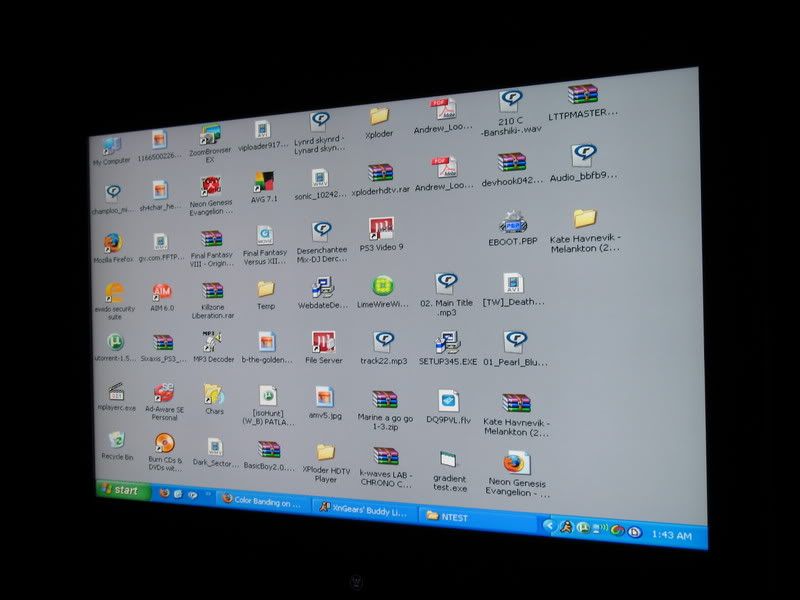
Okay, I downloaded your test, ran my PC to the TV via VGA cable, and I checked out the colors section of the test. I went through all the available colors, one by one. I also set my desktop to gray, as per your instructions.
In what may hopefully be a case of good news, I didn't see any banding whatsoever. Even with these camera shots, they appear perfectly clean. So what gives? Could this be a problem with the PS3, after all? Is it possible that just the HDMI port suffers from banding, or would it affect the whole TV no matter what output? Could maybe the HDMI cable have anything to do with it? It was bought in monoprice by Metal's recommendation . Should I rest easy, now? I was speaking idiomatically. |
Member 98 Level 35.79 Mar 2006
|
NBA, yes; Resistance however is 720p along with Lemmings and Genji 2 (both which did not appear to have banding).
Okay, I can pretty much confirm the banding is from the PS3's end. Earlier I tried both SOCOM 3 and Burnout Revenge on my PS3 (both on progressive scan) and nearly had a heart attack at all the banding on Burnout's tracks and SOCOM's skies. But just now I tried both on the PS2 (hooked to the same set via component) and nearly breathed a sigh of relief as neither game had the banding seen on the PS3. This saves me a lot (and I mean A LOT) of grief, but I'll still wait for someone from another forum who plans to check his PS3 tommorow to confirm the banding (if that's what it even is anymore). As to how to fix this issue on the PS3, I'm not sure whether to wait for a firmware upgrade or try switching cables. I've heard a few people mention that they've gotten better results with an HDMI to DVI cable, although there hasn't been reports of any visual improvements. Most amazing jew boots |
Member 98 Level 35.79 Mar 2006
|
I'm aware of that, but I was worried when the banding appeared in PS3-legit games. But let's crunch numbers; if I don't see it on PC mode, or on cable TV mode, or very very little of it on PS2 mode, and probably none whatsoever on GC mode (this requires further testing), then it has to be a problem on the PS3's end. The question is how to fix it, or when it'll fix itself (firmware).
I was concerned mostly because I hadn't heard any PS3 owners bitch about it (and they bitch about a lot of things), and Blu Ray movies didn't have this issue whatsoever (drive is seperate from the drive for games?). FELIPE NO |
Member 98 Level 35.79 Mar 2006
|
I'd be happy if that was the case, although I still have some slight suspictions as I haven't heard anyone in AVS complain about this. It's mostly been that one dipshit going on and on and on about the flickering issue.
I'll try a few Gamecube games just to be safe. Double Post: Tried Soul Calibur II. Almost no banding (a little seen in Astaroth's pea-soup level) Tried MGS:TTS. Tons of banding  This TV doesn't like gray shades. I almost feel like I'm back to square one. Maybe I should call Westinghouse after all. This TV doesn't like gray shades. I almost feel like I'm back to square one. Maybe I should call Westinghouse after all.What, you don't want my bikini-clad body?
Last edited by Soldier; Dec 20, 2006 at 02:42 PM.
Reason: Automerged additional post.
|


 Soldier