85243 85243 |
 35212 35212 |
|
|
||
|
|
|||||||
| Welcome to the Exploding Garrmondo Weiner Interactive Swiss Army Penis. |
|
GFF is a community of gaming and music enthusiasts. We have a team of dedicated moderators, constant member-organized activities, and plenty of custom features, including our unique journal system. If this is your first visit, be sure to check out the FAQ or our GFWiki. You will have to register before you can post. Membership is completely free (and gets rid of the pesky advertisement unit underneath this message).
|
 |
|
|
Thread Tools |
 Member 98 Level 35.79 Mar 2006 
|
Swapping PC's (and Hard Drives). Need Advice
One of my favorite features of my new LCD is the ability to use it as a mega PC monitor via a VGA cable. However, my PC's resolution only goes up to 1280 by 1024. My mom's PC, which she rarely uses, can go up to 1600-something, which I'm told would make a big difference with my monitor.
So I'm planning to exchange PCs, swapping hard drives so we keep our saved info. I want to swap both the primary and secondary drive. I'm told however that it isn't as simple as just swapping the hard drives though, and that I may have to do some configuration with Bios. So I would like your help on what I should be prepared to configure after the swap to make the experience as quick and painless as possible. Thanks. Jam it back in, in the dark. 
|
Member 98 Level 35.79 Mar 2006
|
This is my LCD in case you were wondering.
http://www.crutchfield.com/S-HOlS8yg...e&i=647LVM37W3 And yes, it DOES support 1080p. And no, I wasn't able to get the resolution any higher. My graphics card is an Intel 82865G Graphics Controller. I tried downloading a driver from Intel's site, but it didn't bump the resolution up. Is there maybe a third party driver or something else I could download to increase the resolution? As for drive swapping, what about just swapping the secondary drives (where I keep most of my stuff in)? Then I would just have to backup whatever few files I have saved in the primary drive, right? Oh, and my PC is a Dell Pentium 4, only about 2 or 3 years old. There's nowhere I can't reach. |
Member 98 Level 35.79 Mar 2006
|
If that was the case, then why was I unable to increase the size when I hooked it up to my (much larger) LCD?
This thing is sticky, and I don't like it. I don't appreciate it. |
Member 98 Level 35.79 Mar 2006
|
I'm away from my computer until tommorow, so you'll have to wait until then, but I *think* I have a PCI slot. I don't need a graphics card fancy enough to run PC games, because I don't play any, but I would like any that will max out the resolutions for my LCD. I mainly want to use it for saved videos and emulators (SNES, PS1, MAME, etc).
I am a dolphin, do you want me on your body? |
Member 98 Level 35.79 Mar 2006
|
I appreciate that, and I'll let you know first thing.
Since I'm also looking into a TV Tuner (standard or HD, preferably the latter), is there perhaps a graphics card that also acts as a TV Tuner? I was speaking idiomatically. |
Member 98 Level 35.79 Mar 2006
|
Looks like my best bet. Buying both products seperately would cost me around the same price anyway.
So I'm back at my PC, but what's the easiest way to tell you whether I take PCI or not? Is it listed anywhere in the Device Manager, or would you require a camera shot of my PC's back? What kind of toxic man-thing is happening now? |
Member 98 Level 35.79 Mar 2006
|
Well, as I mentioned before, I'm looking for a card that can give me the maximum resolutions my TV can handle (1900-something, IIRC) as well as a TV Tuner to watch SD channels. The ability to watch HD channels as well is desirable, but not immediately recquired if it makes a huge difference in price. But if I can get the same HD channels off the tuner, then I wouldn't have to pay for renting out Comcast's cable box anymore.
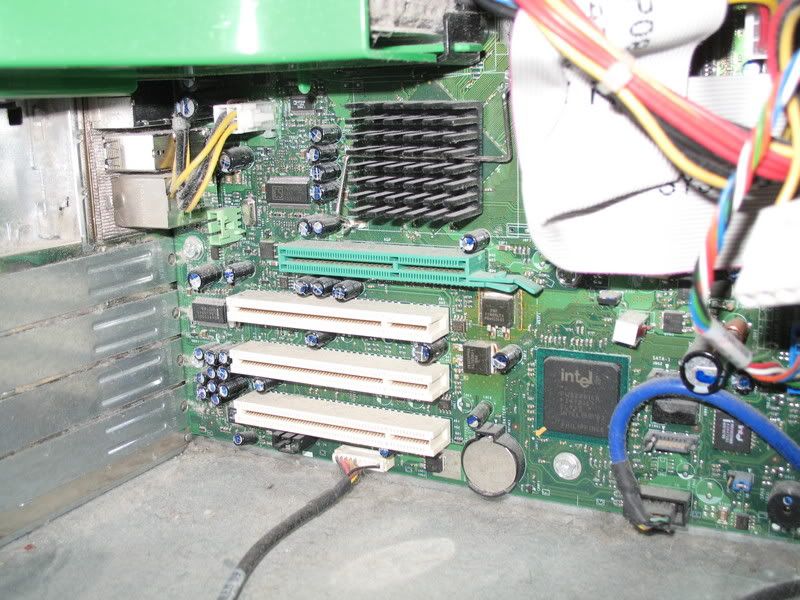
Anyway, I went ahead and took a picture of my motherboard. So I definetely do have PCI slots, but I can't tell if that green slot is an AGP. Anyway, I appreciate the suggestions, and please offer me your best recommendations by today. I'm trying to have my x-mas list ready before the day is done. Double Post: Thanks to Metal Sphere's help, he picked out the two items I'm looking for. http://www.newegg.com/Product/Produc...82E16815116310 http://www.newegg.com/Product/Produc...82E16814102043 He did a lot of searching, and told me it would be cheaper for me if I bought these two instead of an all-in-one. With this, along with a DVR cable, he says that not only will I get resolutions up to the 2000's, but that I'll also get 1080p quality for SD and HD channels. Nice. If you have any other recommendations, though, I'm happy to listen. FELIPE NO
Last edited by Soldier; Dec 10, 2006 at 04:30 PM.
Reason: Automerged additional post.
|
Member 98 Level 35.79 Mar 2006
|
Oh, don't worry about it, I'm just glad I found an ideal solution. If I can get just one of those two items for christmas, I can purchase the other one shortly after. If all goes well, I can probably use this as my source for HD channels, and can return the receiver to Comcast (thus, I would only be paying for the channel service, $5). There's still the question on whether I'll still receive all the extra channels I got from the receiver (and there's a lot; 5 HBO's, 5 Encore's, G4, 3 HD exclusive channels, Fearnet, etc). But I'll take better quality and a cheaper monthly rate over the other option.
I lucked out with the Westy brand during Crutchfield's cyber monday sale. The TV is so good I spend more time trying to find flaws than pluses (I know, it's sad). The biggest flaws are the look of SD channels (which is why I'm trying this PC setup) as well as games under 480p (I'm still calibrating to find the ideal look for PS2 games). But man oh man, 1080p Blu Ray movies look fantastic. I still need to do a journal entry soon. What, you don't want my bikini-clad body? |
Member 98 Level 35.79 Mar 2006
|
Well, keep in mind I've only seen a couple of Blu Ray movies, being Corpse Bride and Ice Age 2 as of this writing (and only bits of Talladega Nights, but that most certainly is not a movie worth judging toward the potential of Blu Ray). However, as someone who's enjoyed some of the finest DVD transfers over an LG upconverting player, I can assure you that there's a huge difference in quality.
Granted I haven't seen either movie on DVD, but I could tell right away that Blu Ray movies, at least in 1080p, deliver the single greatest image quality I have ever seen. There is absolutely no film or video noise that is common on even the best DVD transfers, and nearly every single frame looks like it's being printed right on the screen. Even the sound has managed to impress me with the extra clarity given to its positional audio (in other words, all the speakers, even the rear ones, deliver the same level of boom and pitch). Considering that the Blu Ray format is still in its early stage, this has me very excited for what can be achieved later on, especially by Disney and doubly especially by any anime companies. So yeah, if you ever get a chance to check out what Blu Ray can do, make sure to try out either of those movies, as they're confirmed to have the best transfers for now. If there's any complaint, is that 1080p is a bit TOO perfect; my eyes get a bit sorer as I take in all the extra colors and lighting (my sister mentioned the same thing when she glanced at it), and anything less just doesn't measure up (which is why I've been hesitant with the HD channels, with all the visual noise and such). Anyway, I hope the combo of the tuner and graphics card can pull off what I want. I forgot to ask if I would need any extra RAM or any other crap I might have overlooked. If not, I hope to use my PC as the new receiver for both standard and hi def channels. I've played around with my settings so the HD channels appear quite a bit better (hint: lower the sharpness), but standard channels still balance from decent to craptacular. Edit: I'm not sure why the popup isn't working, but here's a look at what I'm trying to emphasize. http://i79.photobucket.com/albums/j1...s/IMG_8713.jpg Jam it back in, in the dark.
Last edited by Soldier; Dec 11, 2006 at 01:12 AM.
|
Member 98 Level 35.79 Mar 2006
|
Looks like I have to reconsider the TV Tuner portion of my planned setup; it seems it only supports over the air HD, and not digital, which I require.
So I need your help in finding an HD TV Tuner with QAM (digital) and an AGP slot. Hopefully it won't lead to something too pricey.  Most amazing jew boots |


 Soldier