
 85243 85243 |
 35212 35212 |
|
|
||
|
|
|||||||
| Welcome to the Exploding Garrmondo Weiner Interactive Swiss Army Penis. |
|
GFF is a community of gaming and music enthusiasts. We have a team of dedicated moderators, constant member-organized activities, and plenty of custom features, including our unique journal system. If this is your first visit, be sure to check out the FAQ or our GFWiki. You will have to register before you can post. Membership is completely free (and gets rid of the pesky advertisement unit underneath this message).
|
 |
|
|
Thread Tools |
 Member 98 Level 35.79 Mar 2006 
|
Photoshop Help: Transparent Backgrounds
This has always been the biggest hurdle for me concerning Photoshop. I don't even know if I'm saying the right term, but I could use your help to improve on it.
I've been doing a decent job of cropping images and changing the height and width to create my avatars and sigs, but I've always wanted to take things further and create images that don't have any background to it (see Elixir's sigs for example). So to jump on the EVA bandwagon that Qwarky has already beaten me to, I wanted to take the middle image from this page... 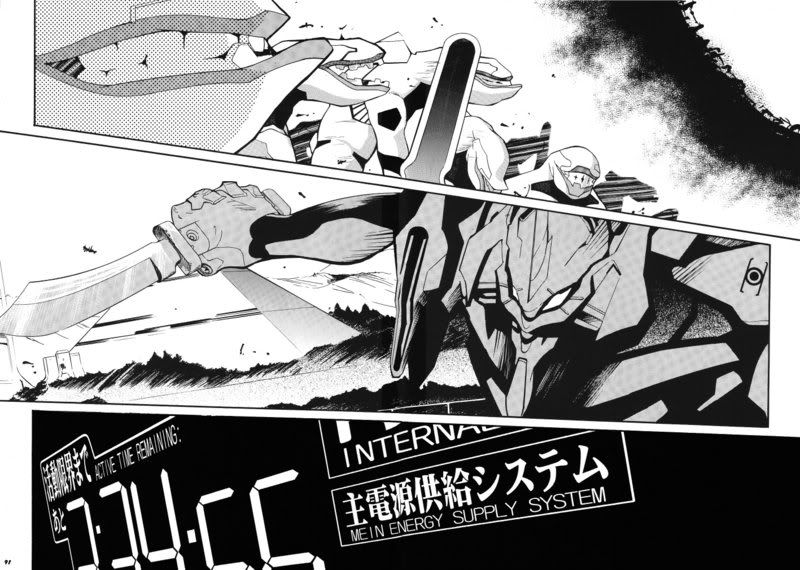 And create a sig keeping the same angles. But unfortunately, this is the best I could come up with using my current skills. 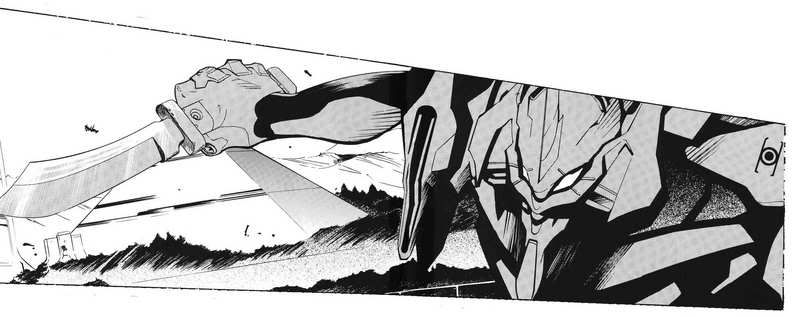 As you can see, I have a white background surrounding the top and bottom of the image. So I could use your help in creating images without any kind of background, which will allow me to become more creative with this and future signatures. Most amazing jew boots 
|
Member 98 Level 35.79 Mar 2006
|
So basically saving the image as a .gif or .png will create a transparent background?
I appreciate fixing the image for me, but I also want to learn how to do it on my own. I want to try and replicate the way Elixir does his sigs. There's nowhere I can't reach. |
Member 98 Level 35.79 Mar 2006
|
Yeah, I've seen that last method used around. I'd like details on how to do that as well. It's probably better to match the color of the forum (or anything else) as the background for my image.
And on the subject, I'd also like to know how Elixir can make random sigs appear whenever someone refreshes the page. I was going to PM him directly on how to do that, but if it's an easy method, do share. Appreciate the help as always. This thing is sticky, and I don't like it. I don't appreciate it. |
Member 98 Level 35.79 Mar 2006
|
Well, I'll ask him about the details for it later. Right now I should focus on transparency. I'll try messing around with paint.net, but I'd still like to know how to create a background to match this forum's color, if it's easier (and I imagine it is).
I am a dolphin, do you want me on your body? |
Member 98 Level 35.79 Mar 2006
|
I was speaking idiomatically. |
Member 98 Level 35.79 Mar 2006
|
Thanks. Also Causabon gave me a good tutorial (with visuals, even), so I should be all set.
http://www.gamingforce.com/forums/pr...wpm&pmid=68355 I have tried to figure it out myself. I play around with Photoshop as best as I could, but it's pretty tricky to figure out every little nook and cranny on your own. What kind of toxic man-thing is happening now? |


 Soldier