
 85243 85243 |
 35212 35212 |
|
|
||
|
|
|||||||
| Welcome to the Exploding Garrmondo Weiner Interactive Swiss Army Penis. |
|
GFF is a community of gaming and music enthusiasts. We have a team of dedicated moderators, constant member-organized activities, and plenty of custom features, including our unique journal system. If this is your first visit, be sure to check out the FAQ or our GFWiki. You will have to register before you can post. Membership is completely free (and gets rid of the pesky advertisement unit underneath this message).
|
 |
|
|
Thread Tools |
 Member 753 Level 13.94 Mar 2006 
|
Taking screencaps in WMPC
I think there was a topic before the most recent crash, but I can't find it in the archives.
I think the problem is common, but trying to do a "PrtScn" using WMPC, actually any video player, doesn't seem to work. When you paste the image into a photo editor such as Photoshop, the image is either blank or really ... screwed up. I know one workaround is to have two video players open and then take the screen cap, but that is extremely inconveniant to do. Does anyone know of a fix so that you can take a screenshot with the PrtScn button? Also, completely unrelated, but I'm having a problem even loading video files with a .avi extension. See when I reformatted my computer and installed Winamp, it decided to give Winamp all the video extensions to work with, since it was the only media player installed at the time. After I installed WMPC, I re-associated .avi's to open with WMPC. Now the files show that they open with WMPC, but when I go to open the file, I get a Windows dialog asking which program I want to open the file with. Nothing that halts me from watching, just annoying. Is there anyway I can get Windows to quit asking the same question over and over? (Checking that box down there that says "Always open with this program" does abseolutely nothing) 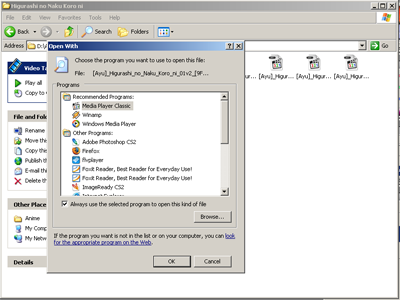 How ya doing, buddy? 
Last edited by KrazyTaco; Aug 19, 2006 at 02:33 PM.
|
Member 753 Level 13.94 Mar 2006
|
That's really weird. I actually tried the File > Save Image thing before posting this and it gave me an error. It seems to work now though... Funny stuff.
How ya doing, buddy? |


 KrazyTaco