
 85243 85243 |
 35212 35212 |
|
|
||
|
|
|||||||
| Welcome to the Exploding Garrmondo Weiner Interactive Swiss Army Penis. |
|
GFF is a community of gaming and music enthusiasts. We have a team of dedicated moderators, constant member-organized activities, and plenty of custom features, including our unique journal system. If this is your first visit, be sure to check out the FAQ or our GFWiki. You will have to register before you can post. Membership is completely free (and gets rid of the pesky advertisement unit underneath this message).
|
 |
|
|
Thread Tools |
 Member 4709 Level 26.30 Apr 2006 
|
I would recommend the X1900 XT. If you want to more future proof your machine, you need to go with the larger amount of memory. You can see this in Oblivion as 512MB cards are more necessary, and this is a trend that will continure. You can find at newegg an ATI X1800XT (256MB) for $249, an ASUS X1900XT (512MB) for $349, and an ASUS X1800XT (512MB) for $509. Basically, this shows that the bang for your buck is the 1900. Since you are buying a new PC, I trust that the $100 is not that large of a price difference. Therefore, it is pretty much a no brainer.
The size of the card is a whole nother matter. Is the media center PC you want to get a MicroATX mobo/case? If it is, start to worry. I have a microATX case (that is not a cube type) and this is a slight problem. I can't install a second 5.25" disc drive because the video card is just too dang long, and it nearly doesnt fit (I have a X800XTPE AGP card). So, it kind of depends on the model and ATX size of the case you are buying. FIND OUT. Secondly, if it is a normal ATX or BTX case, I wouldnt worry about it much. It should fit fine, or you can call HP and cuss up a storm. Most amazing jew boots ~ Ready To Strike ~ :Currently Playing: League Of Legends(PC), Skyrim(PC), Golden Sun: Lost Age(GBA), Twilight Princess(Wii), Portal2(PC), Dragon Warrior II(NES), Metroid Prime 2: Echoes(GC)
|
Member 4709 Level 26.30 Apr 2006
|
From the Specs page:
Three PCI expansion slots (one available) One PCI Express slot This means that it "is" a MicroATX or smaller-sized mobo/case. It seems you can upgrade the graphics card to a 7600GS which says to me that there is room for it. But you do have to consider this as well... 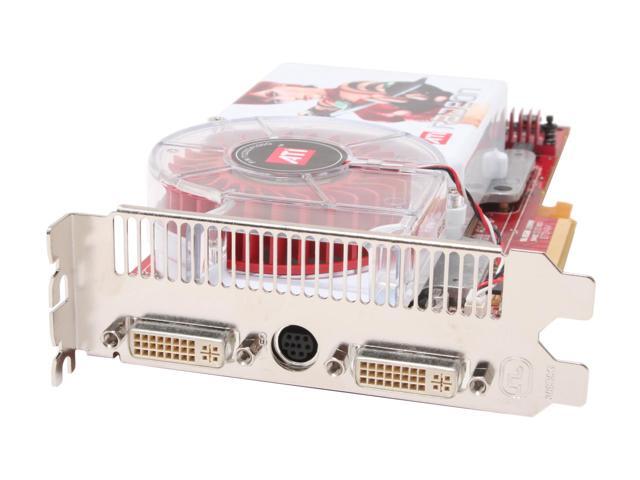 It's double slot and will overlap one of your PCI slots. That gives you 2 PCI slots to use. Also, this thing will be HUGE in your case in a general sense. Here's what I think. If you like that PC alot, then go for it. It seems to be a pretty good price for good hardware. The Media Center aspect is cool (remote and all). Make sure and get the E6600 CPU, and I would say 2GB of the 667Mhz RAM. I would order the computer and see how much room you have inside. When you do that you can measure and see what kinda length you have to work with. Another option here is to hit best buy, and get them to open a HP Media Center case for you and measure that (I'm sure the cases are fairly similar). This will let you know the dimensions you have to work with. In any case, I would bet that you could make it fit. Trust me, I have a MicroATX case and mobo, and with a little effort and no fear, you can make stuff fit. Remember, cases are just hunks of metal, and you can do stuff to them with the right tools to get what you need. I *made* an extra spot to put a hard drive in my case, because once I started putting it together, there was only room for one HD! It was to cramped with little airflow, so I bought a couple little fans, borrowed someones dreml tool (sp?) and put a couple nice square holes on the side and put in a couple fans. I don't even like tools/tool shed stuff either. The point is, you can make it work. The only other thing to fear is PSU issues because the X1900XT pulls ALOT of power. I would think you would be ok with the supplied HP PSU, however this may not be the case when it comes down to it. But again, the only way is to try and then fix it later. I hope this rambling helps. Media Center (smaller PC's) enhance the challenge of PC building/buying. There is risk involved, and there probably will be some frustration and difficulty. But if that is what you want/like go for it. (I love the size of my PC, it was totally worth the hassle  ) )And yes, you can more than most likely use the components in another case. The PSU might be the Micro ATX size, which might cause problems. You would probably be better off finding a case with a PSU then transferring the one that came with the HP. You can find these kinds of case for under $100. The 15-1 reader is a guess. I dont know if this is in a 5.25" slot. If it is, it would be easy to move to a new case. I would venture to say it is not. But again, I think the best idea is to try and make it fit in the HP case. There's nowhere I can't reach. ~ Ready To Strike ~ :Currently Playing: League Of Legends(PC), Skyrim(PC), Golden Sun: Lost Age(GBA), Twilight Princess(Wii), Portal2(PC), Dragon Warrior II(NES), Metroid Prime 2: Echoes(GC)
Last edited by TheReverend; Jul 30, 2006 at 02:13 PM.
|
Member 4709 Level 26.30 Apr 2006
|
Try and take a look at some of these computer reviews. It'll get you a very good idea of what to expect from different manufacturers, how upgradeable they are, and what kind of servicing you will get. If you see one you like, let us know which one you're thinking of.
This thing is sticky, and I don't like it. I don't appreciate it. ~ Ready To Strike ~ :Currently Playing: League Of Legends(PC), Skyrim(PC), Golden Sun: Lost Age(GBA), Twilight Princess(Wii), Portal2(PC), Dragon Warrior II(NES), Metroid Prime 2: Echoes(GC)
|
Member 4709 Level 26.30 Apr 2006
|
Good to hear. If you want to chat about your build, feel free to let us know how it goes, what parts you got, etc. I know I always love hearing about a new build.
Most amazing jew boots ~ Ready To Strike ~ :Currently Playing: League Of Legends(PC), Skyrim(PC), Golden Sun: Lost Age(GBA), Twilight Princess(Wii), Portal2(PC), Dragon Warrior II(NES), Metroid Prime 2: Echoes(GC)
|
Member 4709 Level 26.30 Apr 2006
|
That gear looks beautiful and should work together quite flawlessly. Make sure that you have good Nvidia nForce drivers. The ethernet has to have certain Nvidia drivers installed to work. AM2 should be great, no need to fret much about lack of Conroe. AM2 socket will last you a long time.
Gosh that's a beautiful setup. Attach pics when its done. I was speaking idiomatically. ~ Ready To Strike ~ :Currently Playing: League Of Legends(PC), Skyrim(PC), Golden Sun: Lost Age(GBA), Twilight Princess(Wii), Portal2(PC), Dragon Warrior II(NES), Metroid Prime 2: Echoes(GC)
|


 TheReverend