
 85243 85243 |
 35212 35212 |
|
|
||
|
|
|||||||
| Welcome to the Exploding Garrmondo Weiner Interactive Swiss Army Penis. |
|
GFF is a community of gaming and music enthusiasts. We have a team of dedicated moderators, constant member-organized activities, and plenty of custom features, including our unique journal system. If this is your first visit, be sure to check out the FAQ or our GFWiki. You will have to register before you can post. Membership is completely free (and gets rid of the pesky advertisement unit underneath this message).
|
 |
|
|
Thread Tools |
 Member 1343 Level 28.80 Mar 2006 
|
"Animate windows when maximizing and minimizing" ALWAYS turns itself back on!!!
I hate it when you minimize and maximize in XP and the windows animate the process. So I turn this off in the Performance settings in My Computer's properties, right?
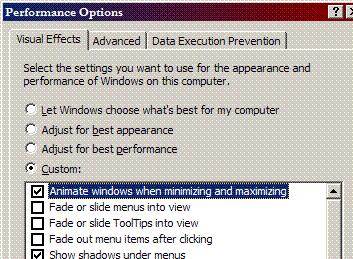 The only problem is, this feature reactivates itself automatically, and I have to go back in and uncheck the fuckin' box 3-4 times a day. Suddenly I'll be working on something and I minimize a window and BAM there's that animation again. Why does this feature keep turning itself back on, and more importantly, how do I permanently disable it? Note: I don't have any "themes" applied that would require this animation, and I have Tweak UI installed and in there you can also specify to disable animation, I believe, which I have done. Jam it back in, in the dark.  |
Member 1343 Level 28.80 Mar 2006
|
There's nowhere I can't reach. |
Member 1343 Level 28.80 Mar 2006
|
Well I have Media Center Edition (genuine), so I doubt that's the problem.
Most amazing jew boots |


 Cellius