
 85243 85243 |
 35212 35212 |
|
|
||
|
|
|||||||
| Welcome to the Exploding Garrmondo Weiner Interactive Swiss Army Penis. |
|
GFF is a community of gaming and music enthusiasts. We have a team of dedicated moderators, constant member-organized activities, and plenty of custom features, including our unique journal system. If this is your first visit, be sure to check out the FAQ or our GFWiki. You will have to register before you can post. Membership is completely free (and gets rid of the pesky advertisement unit underneath this message).
|
 |
|
|
Thread Tools |
  Member 104 Level 55.36 Mar 2006 
|
[GUIDE] How to Connect to the GFF IRC Server. (#gfchat)
Another board wipe, another guide. I'm back again folks, and since mIRC has updated a few times, so has the guide.
Well, here we go again. The chat button is back to it's old self (wait for NYR to fix it) so I've thought of a handy guide to help some of you all get on the infamous GFF IRC Server. First off, you'll need IRC, which you can get here. It is reccomended you always download the newest versions, as anti-hacker preventions are usually added to fix security weaknesses in earlier versions. Open the zip, and install mIRC. Next comes a few steps you'll have to take. First off, open up the options menu (it should pop up when you start it.) It should look something like this: 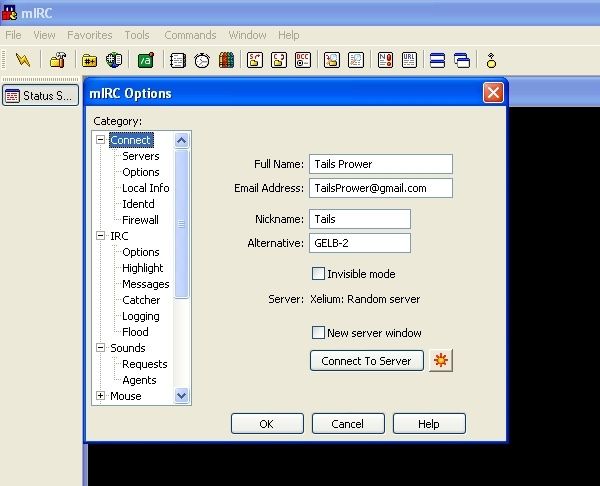 Full Name: First, some basic info. Your name is not required, put anything you want there. Email address: Also optional. Nickname: The name you will use while chatting. Alternative: If your first choice is taken, it will automatically switch to this second nick when you connect to the server. The little flower button next to "Connect to Server" will take you to our next screen, or you can just select Servers in the left hand menu. Click the Add button you see and add the servers listed below the image. 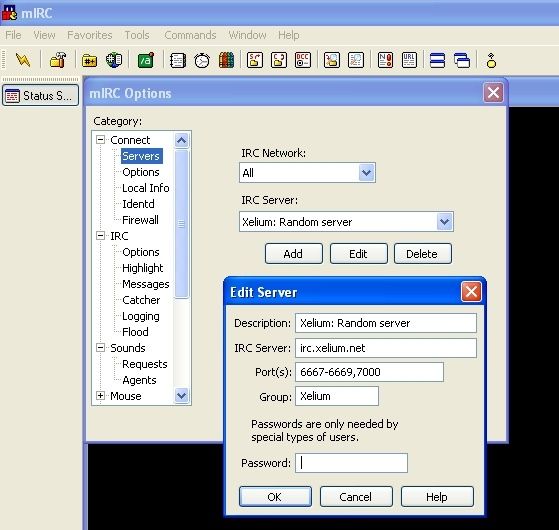 Notice: The current server is irc.psigenix.net. Open the Options menu on the left hand side and hit the "Perform" button. Add the following line: "/join #gfchat", and make sure "Enable perform on connect" is checked off, like so: 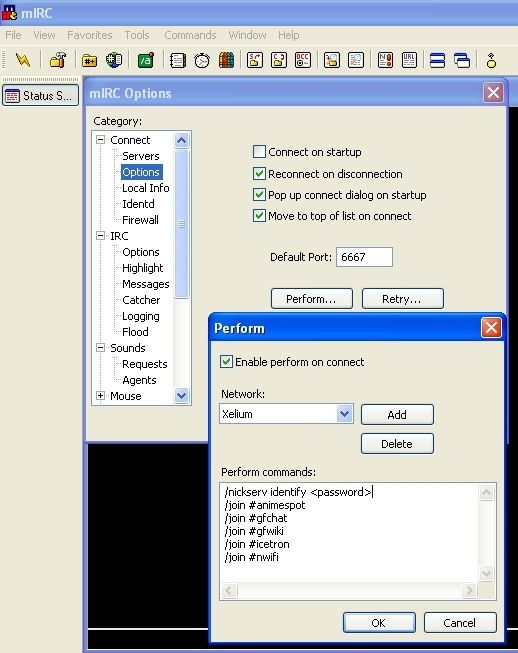 You can add other channels, and identification for Nickserv (see notes section) as well. You are now ready. But, you might want to change a few things, like those the default colors. You used to have to fill these in yourself, but apparently there are now themes. Select Colors from the View menu (or just hit ALT+K) to open your colors screen. It should look like this: 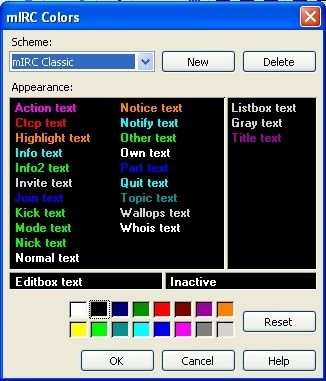 There is one last small thing, which would be your Ident, which comes before your address when someone does a /whois command on you. Put anything you like, it makes no difference. That's about it. Just hit connect and you're on. =D Misc: There are a few commands you should know first. REGISTERING YOUR NICK We have a bot called NickServ which can be used to help protect your nick. The syntax for registering the current nick you are using is: /nickserv REGISTER password email Where password is the pass you want to use and email is your e-mail addy. When you register a nick you must identify with Nickserv when you first connect using the syntax /nickserv identify password. This helps keep others from using the nick you register. People using your nick can be disconnected using the /nickserv ghost nick password method /whois <nick> This will show a persons general info, address, name, IP, how long they've been idle, and so on. /me <text> Will display an action, which is usually accented in purple text. Example: "/me approve that you suck" (as used by Puffinstuff) would show up as... *Puffinstuff approve that you suck There are several control+key combinations that change your text also. Control+K brings up a color menu, where you can change your texts color. Color is not alloow in #gfchat however. Control+B bolds your text, Control+R inverses it, and Control+U underlines it. Feel free to add any questions/comments, and I'll add more things to the guide as I have time. Moderators: Can I please ask someone to re-sticky this thread and copy it into the Board Support forum also? (Like it was before the crash =p) Jam it back in, in the dark.  #654: Braixen
Last edited by Tails; Mar 12, 2008 at 06:01 PM.
|


 Tails
Tails